


Scam Protection Nobody Talks About: Your Kid’s Password
Introduction
Your child uses several online accounts every day. From Roblox and TikTok to school portals, email, and streaming apps, each account holds valuable information. The question most parents never think to ask is simple: are the same login details being used across multiple accounts?
For most kids, the answer is yes. It is easier to remember one password than a different password for every app and website. Unfortunately, scammers know this and often look for these small security gaps when targeting young users online.
Most parents focus on screen time, parental controls, and spotting suspicious messages. Those habits help, but password security is often overlooked. This blog talks about why it matters for scam protection and how to better secure your child’s accounts.
TLDR Good scam protection often starts with something simple: giving every account your child uses a different password. The FBI IC3 2024 Annual Report found that people under 20 filed 17,993 online crime complaints and lost $22.5 million in one year. Weak or reused passwords make it easier for scammers to gain access. Setting up a password manager on your child’s iPhone takes only a few minutes and helps keep accounts more secure.
Why Scammers Go After Kids First
Scammers go after children because children are easier to fool. That is the plain truth, and it helps to understand it without panic.
Kids are trusting. They are still figuring out how the internet works. They are less likely to stop and question a message that promises something exciting. They are also far less likely to tell an adult when something feels wrong, because they worry about getting in trouble.
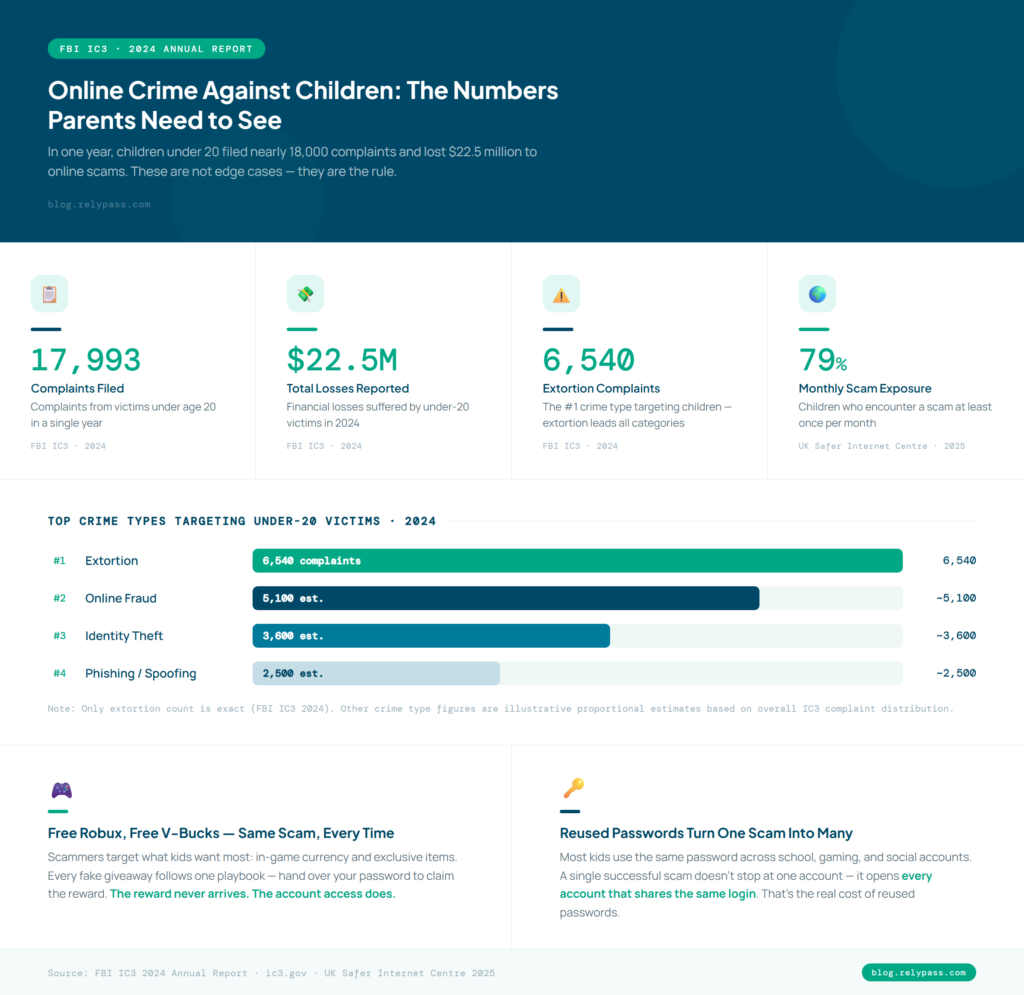
The numbers make this real. The FBI Internet Crime Complaint Center received 17,993 complaints from victims under the age of 20 in 2024. Those victims reported losses of $22.5 million.
Extortion was the number one crime type in that age group alone, with 6,540 complaints filed. This is not a small or occasional problem.
It is also not only happening in the US. Research from the UK Safer Internet Centre found that 79% of children run into scams at least once a month.
Scammers often use fake offers like free Robux, free V-Bucks, or account alerts. If your child reuses passwords, a single click can give attackers access to multiple accounts.
Why Do Passwords Remain a Major Security Risk?
Most advice about online scams teaches kids how to spot suspicious messages and avoid unsafe links. While that is important, password security is often forgotten.
Many children use the same password for different accounts because it is easier to remember. Some save passwords in notes, while others share them with friends. If a scammer gets one password, they may be able to access several accounts.
A password manager makes scam protection easier by creating and saving strong passwords for each account. Kids do not have to remember every password, and parents can help keep important accounts safer.
5 Things You Can Do Tonight for Scam Protection for Your Kid’s Accounts
All of these steps are iPhone-specific. You can work through all of them in about 30 minutes. So, the top 5 things you can do tonight for scam protection for your kid;s accounts are:
1. Audit What Accounts They Actually Have
Sit down with your child and write out every account they use. School login. Gaming accounts. Social apps. Email address. Streaming services they can access. Most parents are surprised by how long the list gets. You cannot protect an account you do not know exists.
2. Create a Unique Password for Each Account
Work through the list and change any password that gets used more than once. A good password runs at least 12 characters and mixes letters and numbers together. It should not include their name, their birthday, or anything obvious. You do not need to memorise any of these passwords yourself. The next step handles that part.
3. Set Up a Password Manager on Their iPhone
A password manager for kids keeps every login stored in one place on the device. Your child opens the app, finds the account they need, and copies the password across. No typing from memory.
No scribbling passwords in a Notes file. No falling back on a reused one because it is the only option they can think of. This is the most practical step in online safety for children, and it is the one most parents have not taken yet.
4. Teach the Free Stuff Rule
Explain one rule to your child and make sure it sticks. If anything online is offering free rewards, free currency, free items, or free access to something that normally costs money, that offer is after their password. It is not a gift. It is a swap. And it is never a fair one.
This single rule covers most of the scams aimed at kids right now. Free Robux, free V-Bucks, fake gift card giveaways. They all follow the same playbook. One rule is enough to catch all of them.
5. Create a Family Plan for What to Do If Something Goes Wrong
Kids do not report scams because they are scared of the reaction. Get ahead of that by removing the fear before anything happens. Tell your child clearly: if you click something by mistake or hand over a password without thinking, come straight to me. No punishment. We sort it out together.
How to Set Up Password Protection on Your Child’s iPhone Without a Subscription
You would not go to bed leaving your front door wide open. But right now, your child’s login details are probably sitting in a Notes app or living inside a memory that gets repeated across every account they own. That is the same kind of risk.
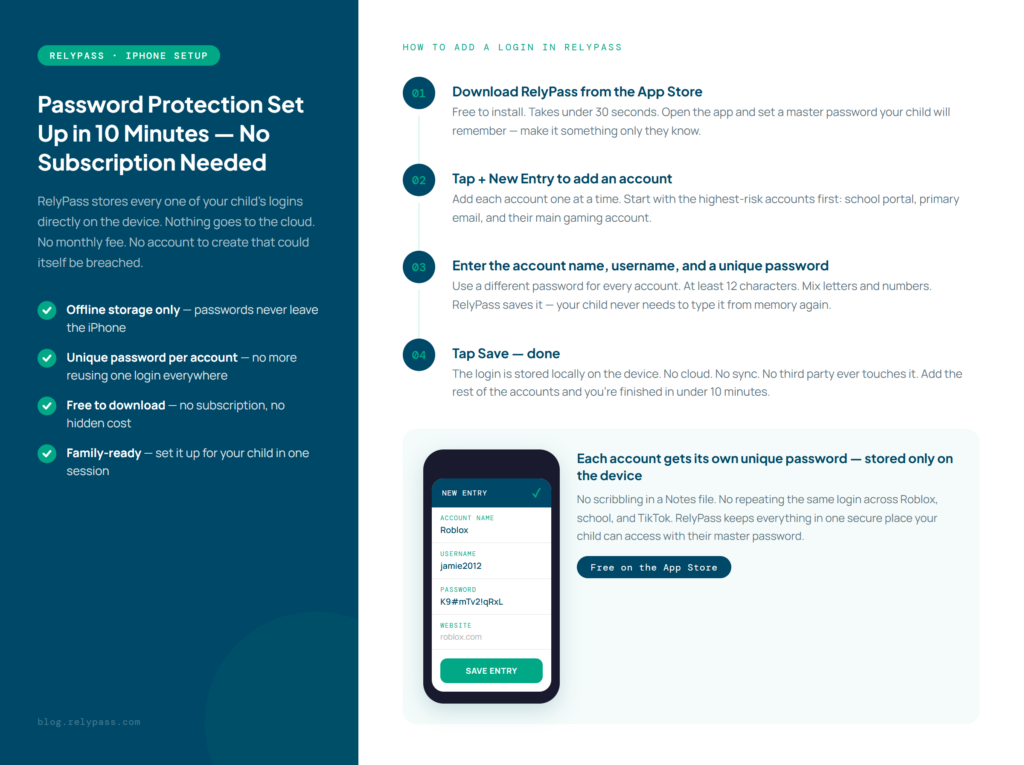
RelyPass is an offline iPhone family password solution that keeps all of your child’s logins stored directly on their device. Nothing is sent to the cloud. If you want to compare it against Apple’s own built-in option, see our guide to the best family password manager for iPhone.
There is no monthly fee to keep track of. There is no account to set up that could be breached somewhere else. It is built for exactly this moment: a parent getting proper password protection in place for their child in about 10 minutes.
A password manager like RelyPass keeps your child’s passwords secure in one place. Each account gets a unique password, reducing the risk of scammers gaining access through reused login details.
End Note
In the end, now you know everything about scam protection. Keeping kids safe from online scams does not require expert knowledge or constant monitoring.
Many online scams succeed because of simple security gaps that are easy to miss. Good scam protection starts with simple steps like using strong, unique passwords and securing important accounts.
If you have not done it yet, consider setting up RelyPass on your child’s iPhone. It is free to download, takes only a few minutes to set up, and adds an extra layer of scam protection where it matters most.
Frequently Asked Questions
How do you protect kids from scams?
The most effective scam protection for kids is making unique passwords a firm rule on every account they use. Pair that with one clear lesson: if something online is offering free rewards, it wants their password. Set up a password manager on their device so they never have to memorise anything or reuse a login. Make sure their school account, gaming accounts, and social accounts all have different credentials and share nothing between them.
What is ghost tapping?
Ghost tapping is a trick where a scammer hides a link or button inside a game or app that a child cannot see. It looks like normal gameplay from the outside. In the background it redirects to a page asking for login details or personal information. The best protection against ghost tapping is keeping kids on official apps downloaded from the App Store, because those hidden scripts cannot run inside a verified app environment.
What should I do if my child already fell for a password scam?
Change the affected password right away. After that, check every other account that uses the same password, because kids reuse logins and one scam can open up several accounts at once. If any payment information was shared, call your bank. File a report at reportfraud.ftc.gov. You can also check whether your data was exposed and find out what to do next. Then use the situation as the reason to set up a password manager so every account gets its own login going forward.
How do I know if a game or app might be a scam?
Be careful with games or apps that promise free coins, skins, gift cards, or special rewards. If your child is asked to enter a password or personal details to claim something, that is usually a sign to stop and take a closer look. When in doubt, encourage them to ask you first.
Is two factor authentication worth using for kids?
Absolutely. It adds an extra step when logging in, which makes it much harder for someone to get into an account. It is a simple way to protect gaming profiles, social media accounts, and email addresses, even if a password is stolen.
Why do scammers go after gaming accounts?
Many gaming accounts contain valuable items, progress, and sometimes payment details. Scammers know that young players can be tempted by offers for free rewards or exclusive items. That is why fake giveaways and trading offers are so common in online games.