


Public WiFi Risks: What Every iPhone User Should Know About Password Safety
You are sitting at an airport. Your flight got delayed. You connect to “AirportFreeWiFi”, open your banking app, and type in your password. The page loads. Face ID does the rest. Everything feels normal.
But what actually happened to that password in those few seconds on that network?
Most people have heard about public WiFi risks. Very few understand what those risks actually mean for their passwords. This post gives you a clear, honest answer. No technical jargon. No scare tactics. Just the information you need to make smarter decisions on your iPhone.
TLDR Not everything you do on public WiFi carries the same level of risk. HTTPS encrypts data as it moves between your phone and a website. But your passwords can still be exposed in ways most people never think about. If your password manager syncs to a cloud server, that sync happens over whatever network you are connected to. That includes public WiFi. The part most people miss is where their passwords actually live. An offline password manager keeps your vault on your device only. It never syncs over any network at all, and keep your passwords safe from public WiFi risks.
What Actually Happens When You Join a Public WiFi Network
Public WiFi networks fall into two categories. Secured networks ask for a password before you can connect. Open networks let anyone join with no login required.
When you connect to any network, your iPhone sends data to a router. The router then passes it along to the internet. On a secure home network, this process has strong protections in place. On an open public network, someone else on that same network could potentially see parts of that traffic.
Open vs. Secured Networks
Open networks have no barrier to entry. Anyone within range can join. That means someone sitting nearby could set up tools to watch what moves across the network. Secured networks are safer because the connection requires a shared key. But they are still public. You still share that network with strangers.
What a Bad Actor Can Actually See
This does not mean you get hacked the moment you connect. That is not realistic. A bad actor would need to actively sit between your device and the router to intercept anything meaningful. Most people at coffee shops are not doing that.
The real public WiFi security risks are quieter. They come from poorly configured networks, fake hotspots designed to mimic real ones, and apps running in the background that you are not paying attention to. That last one is the most important for password safety, and most posts ignore it entirely.
Are Your Passwords at Risk on Public WiFi?
This is the question that actually matters. The answer depends on two things: how you are accessing the password and where it is stored on your device.
What HTTPS Protects
When you type a password into a website that uses HTTPS, that password is encrypted between your iPhone and the website’s server. Someone sitting on the same public WiFi network cannot read it in plain text. HTTPS has genuinely made everyday browsing safer.
So if you are logging into Gmail or your bank through Safari on an HTTPS page, the password you type is protected as it travels. That part is handled.
The Gap That HTTPS Does Not Cover
Here is what most people do not realize.
Cloud-based password managers do not just sit quietly on your phone. They sync. Tools like iCloud Keychain, 1Password, and LastPass regularly communicate with their servers to keep your passwords updated across all your devices.
That sync runs in the background. You never see it happening. And it runs over whatever network your phone is connected to at that moment.
This means the public WiFi risks for your passwords go beyond what you actively type. They include data your apps are quietly sending and receiving while you wait, browse, or do nothing at all.
Cloud managers do encrypt their sync traffic. But syncing over an untrusted network creates exposure that would not exist if your vault never left your device in the first place. That gap is where password safety gets complicated.
How to Protect Yourself on Public WiFi (iPhone)
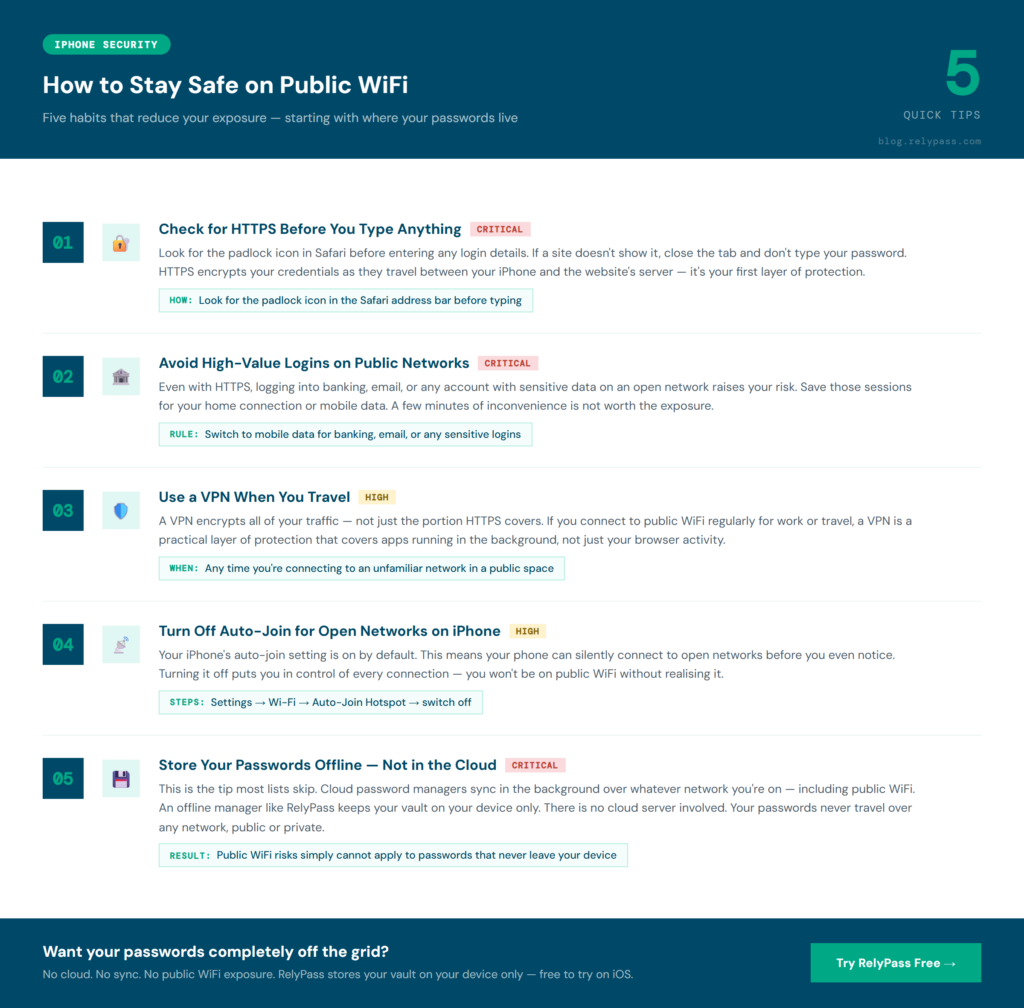
You do not need to avoid public WiFi completely. A few consistent habits will reduce your exposure significantly.
Check for HTTPS Before You Type Anything
Look for the padlock icon in Safari before entering any login information. If a site does not show it, close the tab. Do not enter your password. Learning how to store passwords safely also helps you build better habits around this.
Avoid High-Value Logins on Public Networks
Even with HTTPS protection, logging into banking, email, or any account with sensitive data on an open network raises your risk. Save those sessions for home or your mobile data connection. The few minutes of convenience are not worth the exposure.
Use a VPN When You Travel
A VPN encrypts all of your traffic, not just the portion that HTTPS covers. If you connect to public WiFi regularly for work or travel, a VPN is a practical layer of protection worth adding.
Turn Off Auto-Join for Open Networks on Your iPhone
Go to Settings, then WiFi, and switch off “Auto-Join Hotspot”. This stops your iPhone from silently connecting to open networks before you even notice. Many people are on public WiFi without realizing it because of this setting.
Store Your Passwords Offline
This is the tip that most lists skip. An offline password manager keeps your vault on your device only. There is no cloud server involved. Your passwords never travel over any network, public or private. If your password manager stores everything offline, like RelyPass does, the risks of using public WiFi simply do not apply to your credentials.
Why Where You Store Your Passwords Changes Everything
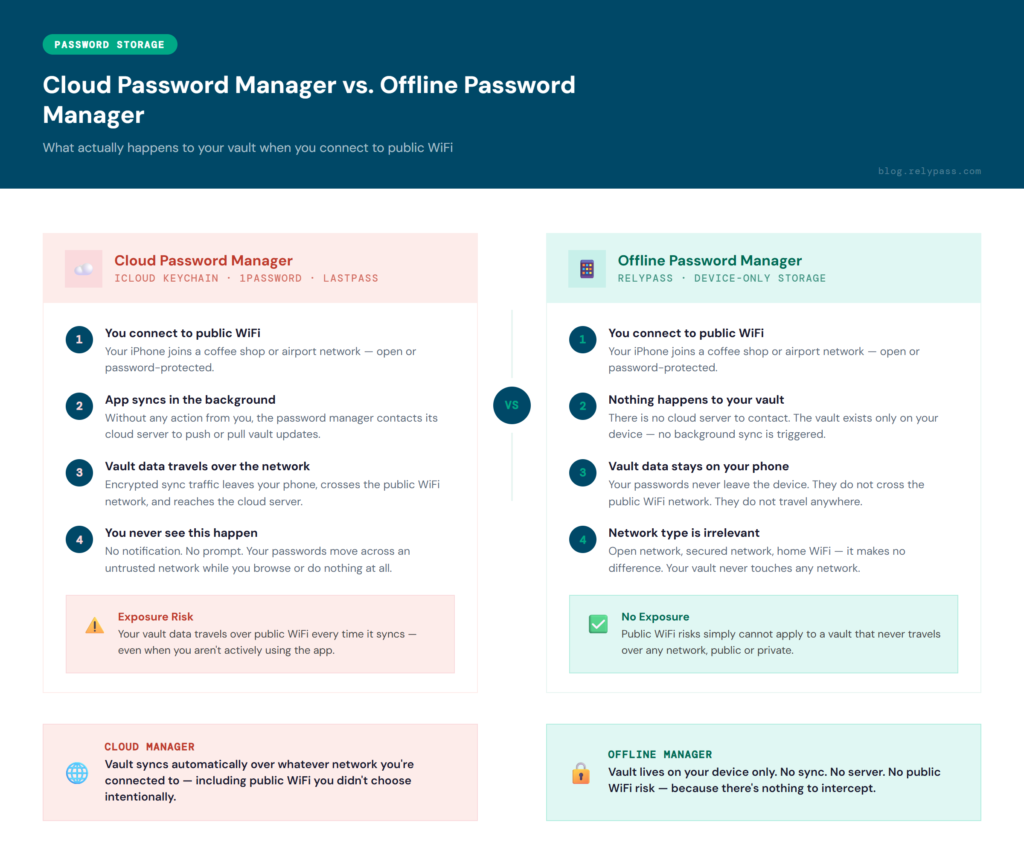
Most people think of password managers as one category. They are not. The storage model is what separates them, and that model has a direct impact on how exposed your passwords are on public WiFi.
How Cloud Password Managers Work
Cloud-based managers like iCloud Keychain and 1Password are built around continuous sync. Your vault lives on their servers and gets pushed to your devices in the background. That is a genuinely convenient setup. But it also means your vault data is regularly moving across the internet, including across whatever WiFi network you happen to be on.
How Offline Password Managers Work
An offline manager works differently. Your vault lives on your device alone. It does not connect to any external server. It does not sync over your home network, your office WiFi, or the network at your local coffee shop.
The difference between online and offline password managers comes down to one thing. Where does your data sit when it is at rest, and where does it go when it moves? With an offline manager like RelyPass, the answer is simple. It stays on your phone. It goes nowhere.
Public WiFi risks cannot affect a vault that never touches a network. For a closer look at why this matters, read our full breakdown of offline password manager security.
What Most iPhone Users Get Wrong About Password Safety
A lot of iPhone users assume that Face ID or a strong password is enough. Those things protect access to your device. They do not protect what happens to your password data after your app opens.
Trusting the App Does Not Mean Trusting the Network
You might fully trust your password manager app. That trust is reasonable. But the app still has to operate within your network environment. If the app syncs to a cloud server and you are on an open network, that sync is happening in a space you do not control. The app is not doing anything wrong. The network is the variable you cannot manage.
Background Activity Is the Blind Spot
Most people think about password risk as something that happens when they type. The real public WiFi security risks often come from what apps do between your keystrokes. Syncing, refreshing, checking for updates, all of this happens automatically. On a trusted home network, that is fine. On a public network with unknown users, it adds risk you are not aware of.
The Assumption That HTTPS Covers Everything
HTTPS is genuinely helpful. It protects data in transit between your browser and a server. But it does not cover every form of data your device sends. Apps that sync outside the browser, background refresh activity, and authentication tokens that travel with your requests can all carry information that goes beyond what the padlock icon in Safari protects.
Signs You May Already Be Exposed on Public WiFi
You do not always know when something has gone wrong on a public network. But there are patterns that suggest your password safety habits may need a review.
You Use the Same Passwords Across Multiple Accounts
If one credential gets intercepted on a public network, a person who reuses passwords is far more exposed than someone who uses unique passwords for every account. A password manager makes unique passwords easy to maintain. But the storage model still determines how safe those passwords are outside your home.
Your Password Manager Syncs Automatically
If your password manager shows activity across devices without you doing anything, it is syncing in the background. On a trusted network, that is a feature. On a public network, it means your vault data is in motion in an environment you cannot fully control. This is one of the clearest signs that switching to an offline model would reduce your exposure significantly.
You Connect to Open Networks Without Thinking
If you join any available network automatically, you may be on public WiFi more often than you realize. The auto-join setting on iPhones is turned on by default. Combined with a cloud-based password manager, this creates ongoing background exposure every time you are in a public space.
Understanding the risks of using public WiFi is the first step. Changing a few habits is the second. And choosing where your passwords actually live is the decision that matters most.
End Note
Finally, public WiFi risk is an issue that you must consider. Sometimes, public WiFi can be convenient, but it is important to understand how it affects your password security. Secure websites help protect your information, but some apps may still share data in the background while you are connected.
A few simple steps, like using trusted networks, checking for secure websites, and turning off automatic connections, can help reduce risks. Most of all, keeping your passwords stored securely gives you better protection wherever you connect.
Frequently Asked Questions About Public WiFi Safety
Is it safe to enter passwords on public WiFi?
It depends on how your passwords are stored and where you are entering them. If you are typing a password into an HTTPS website, the data is encrypted in transit, which provides meaningful protection.
But if your password manager syncs to a cloud server, that background activity happens over whatever network you are currently on, including public WiFi. The safest setup is an offline password manager. Your vault stays on your device and never syncs over any network, public or private.
What is the main risk of public WiFi?
The most common risk is a man-in-the-middle attack, where someone on the same network intercepts data traveling between your device and the router. This is most concerning on open networks with no password protection. On networks that require a login to join, the risk drops but does not go away. Most public WiFi users will not be actively targeted. But the exposure grows when you are entering sensitive login details or running apps that sync data in the background. Knowing the public wifi security risks helps you understand which habits actually matter.
How to stay safe when using public WiFi?
Use HTTPS websites only. Avoid logging into banking, email, or sensitive accounts while on public WiFi. Turn off your iPhone’s auto-join setting for open networks. Use a VPN if you connect to public networks often. And use an offline password manager so your vault stays on your device with no cloud sync involved. These are the practical answers to how to stay safe when using public WiFi without giving up the convenience of staying connected wherever you go.
Can someone really access my information on public WiFi?
It can happen, but it is not as common as people think. The biggest risks come from unsecured networks, fake hotspots, and entering sensitive information on websites that are not properly secured.
Is it a good idea to check my bank account on public WiFi?
If possible, wait until you are on a trusted network or use your mobile data instead. Public WiFi adds an extra layer of risk when you are accessing accounts that contain sensitive personal or financial information.
Should I leave WiFi turned on all the time?
Not necessarily. Turning WiFi off when you are not using it can stop your phone from connecting to unfamiliar networks automatically. It is a small habit that can help you stay safer when you are out and about.