


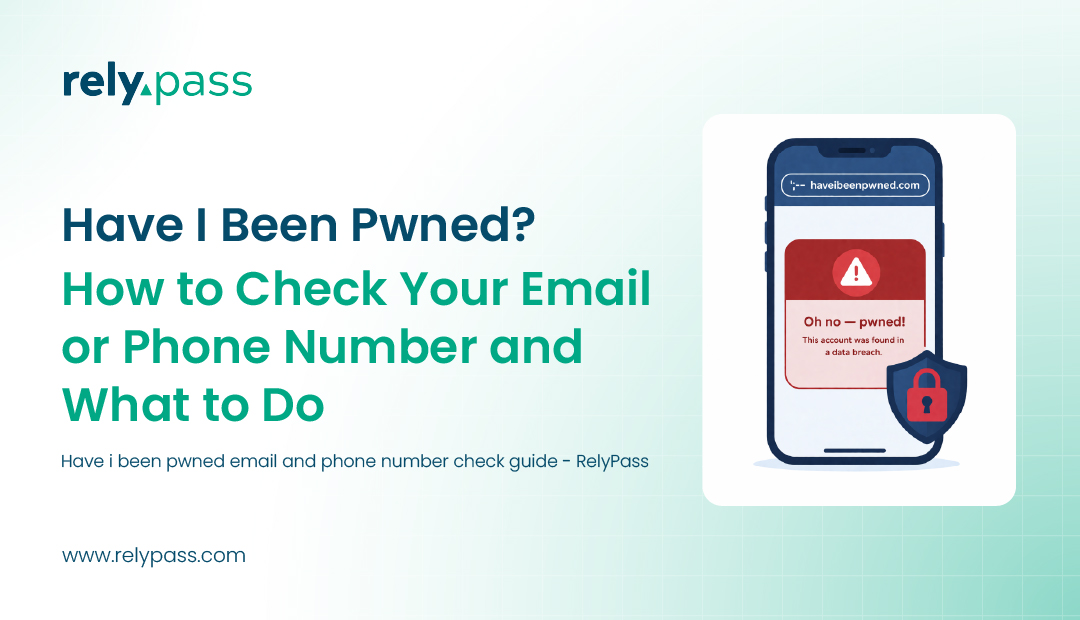
Am I Pwned? How to Check Your Email or Phone Number and What to Do
Is your email already in a hacker’s list? Is your password being used on your bank account right now by someone you have never met?
Stop and think for a second. When did you last check?
Billions of passwords are leaked every single year. Your information could be sitting in a breach from 2021, and you would have no idea. No notification. No warning. Nothing. Just your data floating around on hacker forums while you go about your day thinking everything is fine. If you’ve ever wondered whether can iPhones get hacked through a data breach, the connection starts here. If you’ve ever wondered whether can iPhones get hacked through a data breach, the connection starts here. If you’ve ever wondered whether can iPhones get hacked through a data breach, the connection starts here.
And the worst part? Most people only find out when it is too late. When the bank calls. When the account is locked. When the damage is already done.
You do not have to wait for that moment. Right now, in the next few minutes, you can check “am I pwned” to see if your email or phone number has been exposed. If it has, this blog will walk you through every step you need to take to stop it from getting worse.
Table of Contents
TL;DR
Go to haveibeenpwned.com and enter your email or phone number. If it appears in a breach — here’s what to do:
Password exposed? Change it on every site you used it. Switch to unique passwords.
Phone number exposed? Call your carrier and request a SIM lock. Replace SMS 2FA with an authenticator app.
Financial data exposed? Call your bank immediately. Review recent transactions. Request a fraud alert.Email only? Enable 2FA on your email. Expect phishing — don’t click unexpected links.
What Does “Pwned” Mean?
key. The mistake spread and eventually became a cybersecurity term.
It simply means your personal data was exposed in a breach. Your email, password, or phone number got into the hands of people who should not have it.
When a company gets hacked, your data does not just disappear. It gets shared, sold, and reused by attackers. Someone could already be using your details to get into your other accounts.
That is why knowing if you are pwned matters. If your data is out there, you need to know about it.
Now, I believe your know the proper meaning of ‘am I pwned?’
What Happens When You Get Pwned
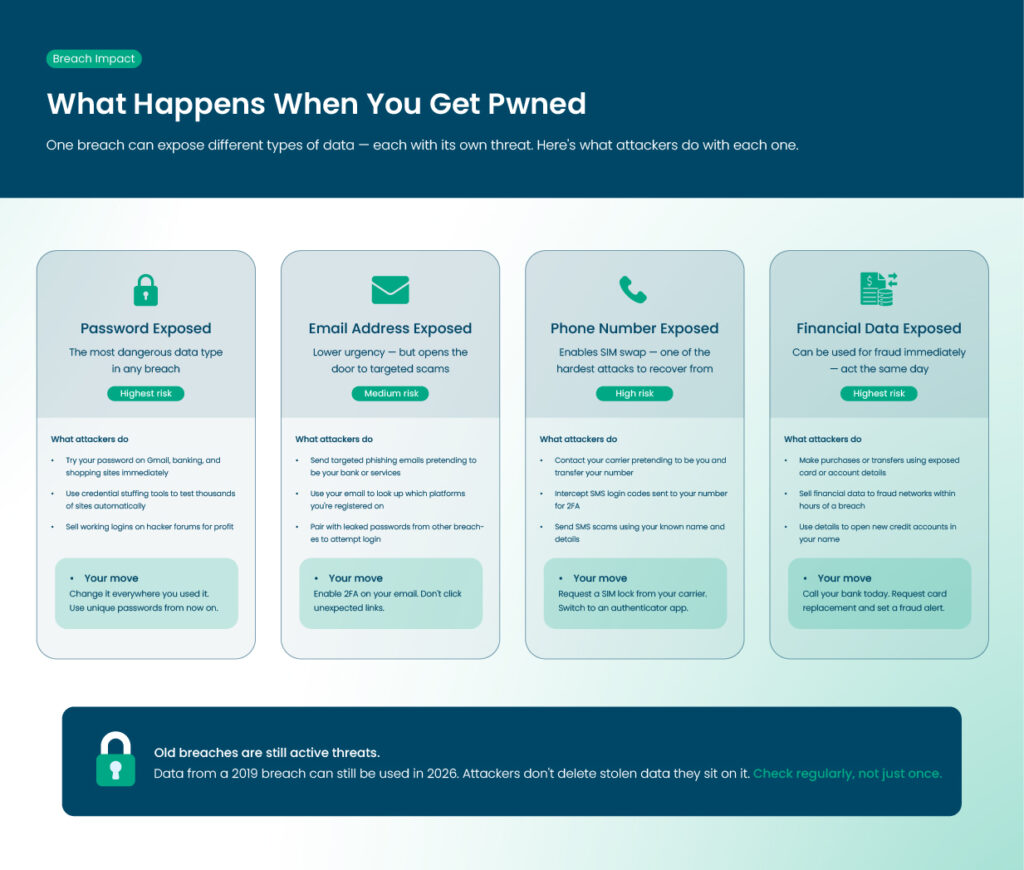
When a company is hacked, the stolen data often includes emails, usernames, and passwords. Sometimes it also includes phone numbers, addresses, and financial information.
This data may be shared on hacker forums, sold, or used to attack other accounts. Even old breaches can still cause problems today.
Exposed Passwords
If your password is exposed, attackers may try it on other sites. Reusing passwords increases the risk across multiple accounts.
Exposed Email Addresses
Even just your email can be enough for scammers. They can send targeted phishing emails and may already know which services you use.
Leaked Phone Numbers and Financial Data
A leaked phone number can lead to SIM swap attacks or SMS scams. Financial data can be used for fraud right away.
How One Breach Can Affect Many Accounts
A single data breach can put many of your accounts at risk. When hackers steal login details from one site, they often use the same email and password combinations to try accessing other platforms.
This technique, known as credential stuffing, works especially well if you reuse passwords. Even accounts you think are safe, like shopping or banking sites, can be vulnerable.
To protect yourself, always use unique passwords for each account. Regularly checking if your email or password has been exposed helps you act quickly before attackers gain access.
Where Leaked Data Actually Goes: A Quick Dark Web Primer
When a company gets hacked, the stolen information can end up on the dark web. It is a hidden part of the internet that you cannot access through a regular browser. Hackers often share or sell stolen emails, passwords, and other personal details there.
You do not have to visit the dark web to find out if your information has been leaked. Have I Been Pwned checks known data leaks and shows you if your email address is included in any of them.
The check is based on actual breach data, not a guess. It compares your email address with information from known breaches and lets you know if it has been exposed.
If your email appears in a breach, take action quickly. Find out what information was exposed and change the affected passwords. If you used the same password on other accounts, change those too. You should also turn on two-factor authentication where possible, to give your accounts extra protection.
How to Check If Your Email Has Been Exposed
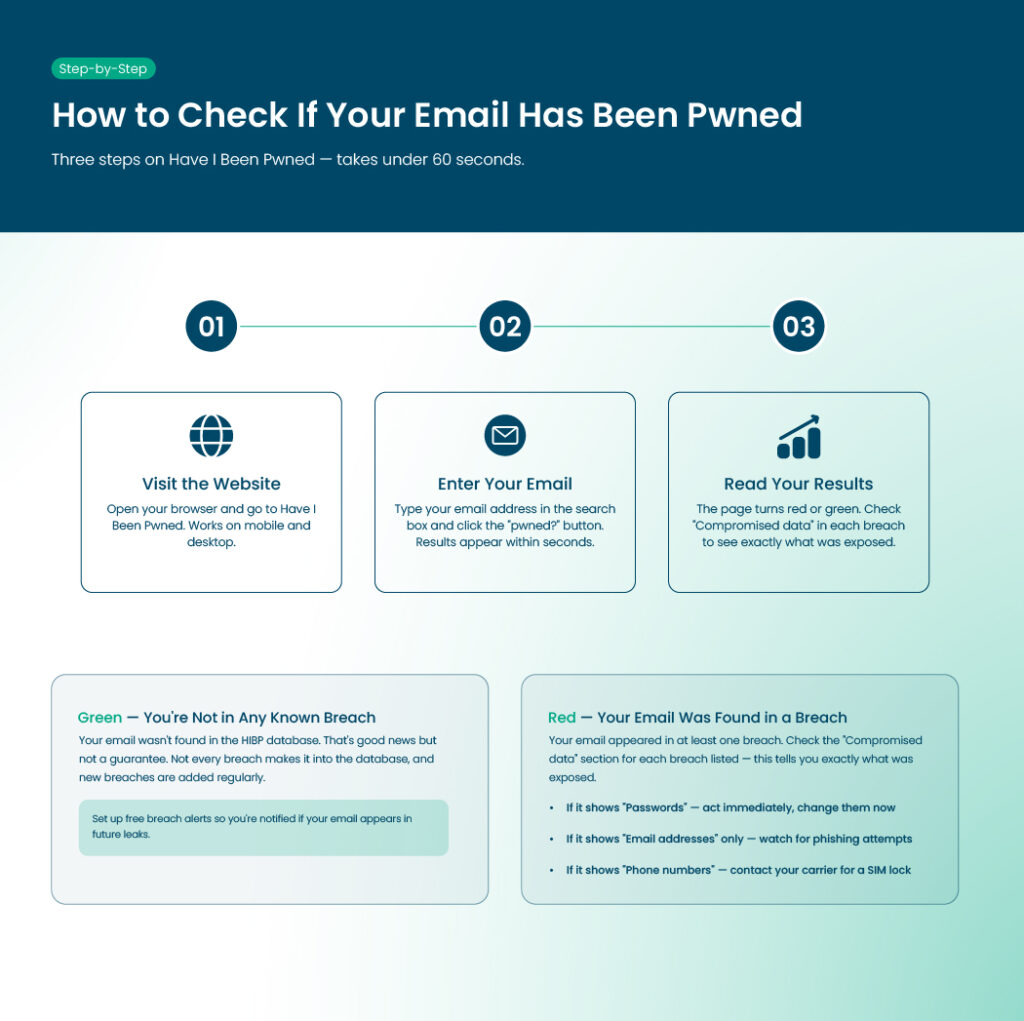
Have a look at the ways to check if your email has been exposed:
Using Have I Been Pwned
Have I Been Pwned, or HIBP, is a free tool created by security researcher Troy Hunt. It checks your email or phone number against a database of billions of leaked records.
Step 1: Visit the Website
Go to haveibeenpwned.com on your browser. The site is fast and works on mobile devices too.
Step 2: Enter Your Email
Type your email in the search box and click the “pwned?” button. The results appear within seconds.
Step 3: Understand Your Results
If the page is red, your email was found in at least one breach. You will see a list of breaches, including the company, date, and what type of data was exposed.
If the page is green, your email was not found in any known breach. That is good, but remember that not all breaches are included in the database.
What the Breach Details Tell You
Check the “Compromised data” section for each breach. If it shows “Passwords,” act immediately. If it only shows “Email addresses,” stay alert for phishing emails.
Other Tools to Double-Check
Using more than one service can help because different tools have different data sources.
- Bitwarden Data Breach Report: If you use Bitwarden, it can check your email inside your account.
- Mozilla Monitor: This tool checks your email against known breaches and sends alerts when your email appears in new leaks.
- NordPass Data Breach Scanner: NordPass can check your email for free and scan saved passwords for leaks.
How to Check If Your Phone Number Has Been Pwned
There are many ways to check if your phone number was leaked so that you can find out the answer to ‘am I pwned.’ So, the ways are:
Phone Number Checks on HIBP
HIBP allows phone number searches. This feature was added after the Facebook breach in 2021 exposed over 500 million records.
Step 1: Enter Your Phone Number
Go to haveibeenpwned.com, click the “Phone Numbers” tab, and enter your number with the country code. Do not include spaces or dashes.
- US example: +14155551234
- UK example: +447911123456
- Canada example:+1416-555-0199
Step 2: Understand the Risk
Phone numbers are linked to banking, WhatsApp, and two-factor authentication codes. A leaked number can lead to SIM swap attacks or SMS scams.
SIM Swap Attacks
Scammers contact your mobile carrier and pretend to be you. They transfer your number to a new SIM card and receive all calls and messages, including login codes.
SMS 2FA Risks
If your number is leaked, SMS-based two-factor authentication is less secure. Switching to an authenticator app is safer.
Step 3: Take Action
Ask your carrier to add a SIM lock to your account. Review accounts that use SMS login codes and switch to an authenticator app if possible. Is ‘Have I Been Pwned’ Safe?
Let’s find the answer here:
Who Runs HIBP
Troy Hunt, an Australian cybersecurity researcher, created and maintains HIBP. He is open about how the site works.
Does HIBP Store Your Searches
No. HIBP does not log your searches.
Encryption and Privacy
All searches use HTTPS, meaning your data is encrypted. Nothing you enter is stored unless you sign up for alerts.
What is Stored for Alerts
If you sign up for notifications, only your email, subscription date, and a verification token are stored.
Checking Passwords Safely
HIBP’s password checker uses k-Anonymity. Your password is hashed locally, and only a fragment of the hash is sent to the server. Your password is never fully transmitted.
Government Endorsements
HIBP is recommended by the UK National Cyber Security Centre, the Australian Cyber Security Centre, and other agencies worldwide.
Using HIBP Data in Other Tools
Apps like 1Password and Bitwarden use the same breach database safely inside their apps. Your information does not leave their environment.
What to Do If the Answer is Yes to ‘Am I Pwned’
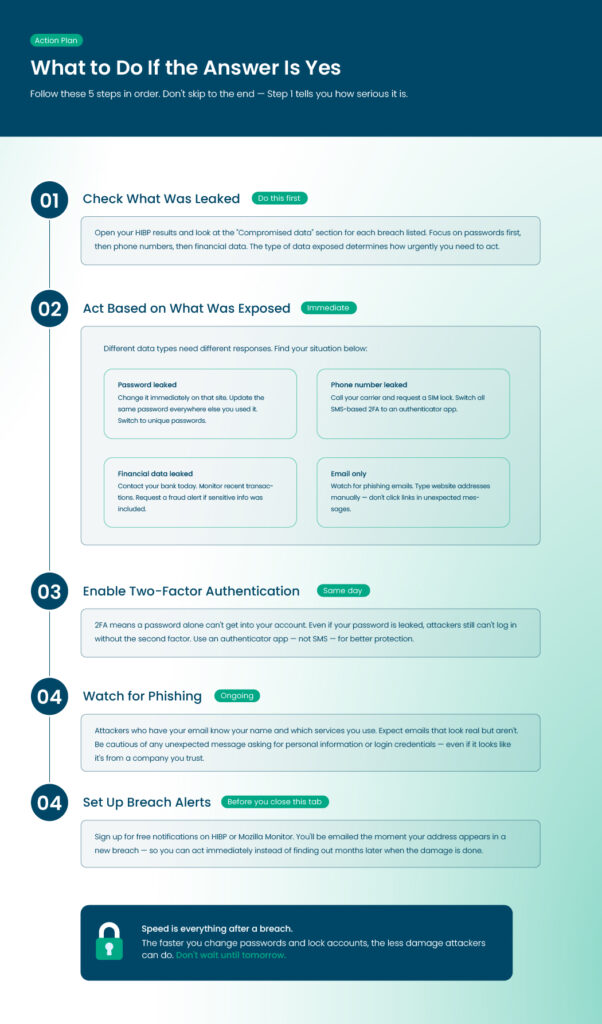
Finding out your data is exposed is not pleasant, but taking action helps.
Step 1: Check What Was Leaked
Look at your HIBP results. Focus on passwords first, then phone numbers, and financial data last.
Step 2: Act Based on What Was Exposed
- Password Leaked: Change it immediately. Update the same password on other sites. Use a password manager for unique passwords.
- Phone Number Leaked: Request a SIM lock and switch SMS 2FA to an authenticator app.
- Financial Data Leaked: Contact your bank, monitor transactions, and consider a fraud alert if sensitive information is included.
- Email Only: Watch for phishing messages. Type website addresses manually instead of clicking links in emails.
Step 3: Enable Two-Factor Authentication
2FA ensures a password alone cannot access your account. Use an authenticator app instead of SMS codes for better security.
Step 4: Watch for Phishing
Attackers may send messages using your name and email. Be cautious of unexpected messages asking for personal information or login credentials.
Step 5: Set Up Alerts
Use HIBP or Mozilla Monitor for free email notifications. You will be informed of any future breaches quickly.
Notable Breaches That Made People Ask “Am I Pwned?”
Let’s explore the reasons here together:
Facebook and Meta Breach
In 2021, 533 million Facebook accounts were exposed. Phone numbers, names, locations, and emails were included. This led HIBP to add phone number checks.
LinkedIn Breaches
LinkedIn has had several major data leaks. Attackers use those credentials on other platforms, taking advantage of reused passwords.
RockYou2024 Password Compilation
In 2024, almost 10 billion passwords from many previous leaks were posted online. Old passwords that are still in use are now high risk.
Lessons from These Breaches
Breach data does not disappear. Information from 2019 can still be used in 2026. Checking and acting on your data is important.
How to Protect Yourself from Future Breaches
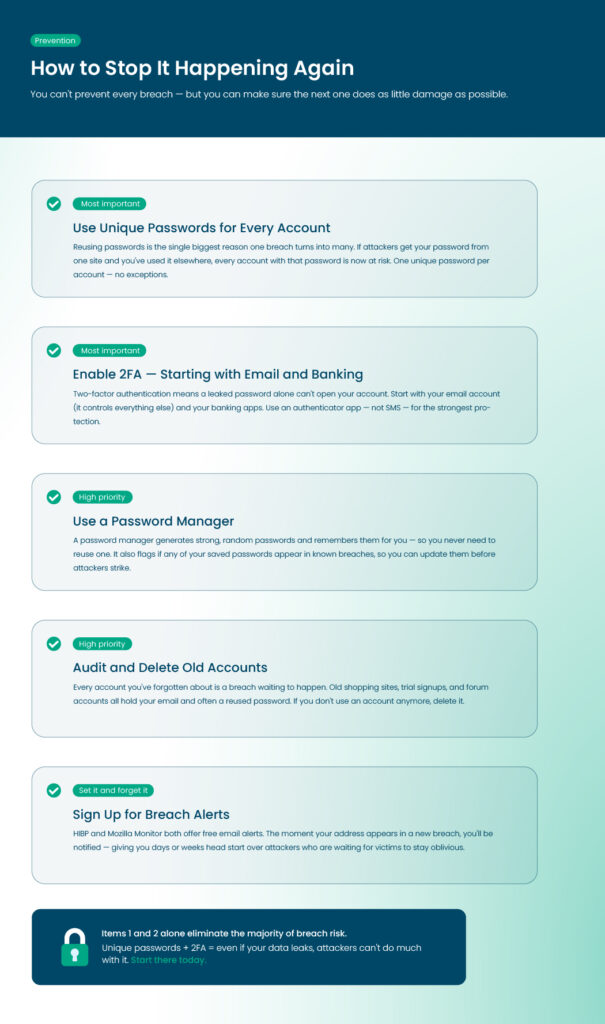
You cannot stop every breach, after finding a ‘yes’ to ‘Am I pwned?’ However,you can reduce the damage.
So, what can you do to protect yourself from being‘Am I pwned’ in future:
Breach Prevention Checklist
- Use unique passwords: Do not reuse passwords across accounts.
- Enable 2FA: Start with email, banking, and accounts linked to your phone.
- Use a password manager: Generate strong, random passwords and store them safely.
- Audit old accounts: Delete accounts you no longer use.
- Sign up for alerts: Use HIBP or Mozilla Monitor to get early warnings.
How a Password Manager Helps
A password manager generates complex passwords, detects reused ones, and makes updating quick and easy. This reduces risk immediately after a breach. If you need the best password manager, try RelyPass today to keep your passwords protected.
End Note
In the end, knowing, “am I pwned?” can save you a lot of trouble. Checking your email or phone number shows if your information has been exposed. If it has, changing passwords, using two-factor authentication, and setting up alerts can protect your accounts.
Regular checks and simple security steps can save you from being pwned. Staying on top of your data helps you avoid identity theft and keeps your accounts safe.
Being pwned in a past leak is a different question from an active compromise happening right now. If you’re still logged in but something feels off, that’s worth checking on its own.
Frequently Asked Questions
Can I check my phone number for breaches?
Yes. Go to Have I Been Pwned, click “Phone Numbers,” and enter your number with the country code. Do not use spaces or dashes. This will show if your number has appeared in any known breaches. Exposed numbers can be used for SIM swap attacks or to access accounts without your permission.
Is Have I Been Pwned safe?
Yes. The site is run by security expert Troy Hunt. It does not save your searches and uses secure connections. Only your email or phone number is checked, and nothing is stored unless you sign up for alerts.
What should I do if I am pwned?
Check what information was exposed. If passwords were leaked, change them on all accounts where you used the same password. If your phone number was leaked, add a SIM lock and use an authenticator app instead of SMS for 2FA. Keep an eye on financial accounts and sign up for alerts to catch future breaches quickly.
Can being pwned lead to identity theft?
Yes. If attackers get your personal info like email, phone number, or financial details, they can pretend to be you. This can lead to fraud or new accounts in your name. Identity theft risk is higher if financial or sensitive data were exposed. Here is how to protect yourself from identity theft for free.
Does HIBP show the exact password that was leaked?
No. HIBP shows which breach your email appeared in and what type of data was exposed. It does not show the actual password. You can use the Pwned Passwords tool to check passwords safely without sending your real password.
How often should I check if I’ve been pwned?
Check every few months, especially if you reuse passwords. Signing up for alerts will notify you automatically if your email shows up in a new breach. Update passwords immediately when a breach happens. If the company reaches out first instead, here’s what to do if a company tells you directly.
Remember just one password — access all the rest
RelyPass is a free iOS password manager with bank-level encryption. Your data stays on your device — private, secure, and always accessible.