



Facebook Login Issues? 12 Fixes for Error & Password Problems
Facing Facebook login issues? Well this happens due to Facebook service issues and many more. However, most people ask, how to fix this issue?
Well you can fix it by saying the password is wrong though it is right to deal with it. There are also other ways that you can easily follow and in this blog I will explain all the easiest ways to fix this issue.
Here, you will also learn the main reasons of login issues so that you can prevent it from happening again in future.
So, let’s begin the discussion with why Facebook login issues happen.
Table of Contents
Why Facebook Login Issues Happen
There are many reasons why Facebook login issues appear. Some issues come from your password, some from your device, and others from Facebook’s own systems. Understanding what is happening behind the scenes helps you fix the problem much faster.
Let’s see why these issues happen:
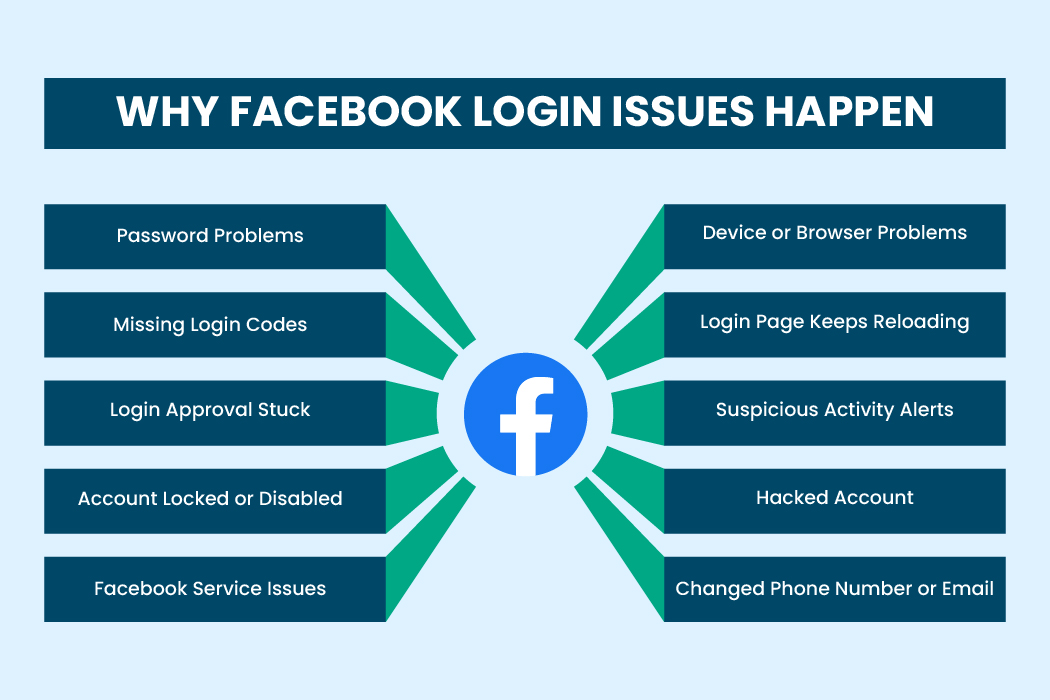
Password Problems
One of the most common causes is a password mismatch. Even if you believe you typed the correct password, the saved password in your browser may be outdated. Auto-fill tools sometimes enter older login details. If your caps lock is on or you are typing on a mobile screen, small errors can easily happen.
Missing Login Codes
Account Locked or Disabled
Facebook sometimes locks an account if it detects suspicious behavior. This might include logging in from a new country, entering the wrong password several times, or unusual activity that looks unsafe.
Facebook Service Errors
Sometimes the problem is not on your device at all. Facebook might be down for maintenance or experiencing server problems. When this happens, many people face Facebook login issues at the same time.
Device and Browser Problems
Your browser may be storing old data or corrupted cookies that interrupt the login process. If you use an outdated version of the app, your device may not load the login page correctly.
Unexpected Error Messages
Unexpected errors appear when your network connection is unstable, when your app is outdated, or when Facebook detects conflicting activity on your account.
Suspicious Activity Alert
Facebook uses automated systems to detect unusual behavior. If something seems different from your usual login pattern, you may be temporarily blocked until you verify your identity.
Hacked Account
If someone else changes your password, phone number, or email, you may lose access completely. This is one of the more serious Facebook login issues and needs immediate recovery.
Changed Phone Number or Email
If you recently changed your phone number or email, your old login information may no longer work. This causes confusion, especially if you forgot to update your Facebook settings.
The Password Problem of Facebook
Most blogs talk about clearing your cache or checking your connection. Few talk about the real cause behind many Facebook login issues: password habits.
After studying stories on support pages and public forums, one idea stood out again and again. Many people were locked out simply because their password habits created a chain of problems.
Saving Passwords in Too Many Places
When your password is saved across browsers, devices, and random apps, you end up with competing versions. One device uses an older password. Your phone remembers one version. Your laptop saved another. This mismatch confuses the system.
Reusing the Same Password
When people reuse passwords, these passwords end up exposed on other platforms. If one app has a security problem, your password becomes unsafe everywhere. When the system detects this, it may reset the password for your safety.
Weak Passwords
Short passwords get reset far more often. When the system notices danger, it forces password changes. This makes users feel like they forgot their password or think their account was hacked.
Autofill Problems
Autofill tools store your passwords silently. When you update your password on one device but autofill still holds the old one, you end up entering the wrong password without knowing it.
How Password Managers Help
A trusted password manager keeps one version of your password across all devices. Tools like RelyPass help you avoid weak or reused passwords and store your login details safely. This reduces the chance of Facebook login issues and makes recovery smoother.
Top 10 Ways to Fix Facebook Login Issues
Now that you know the common causes, here are the easiest and most effective ways to fix Facebook login issues.
So, the top 10 ways are:
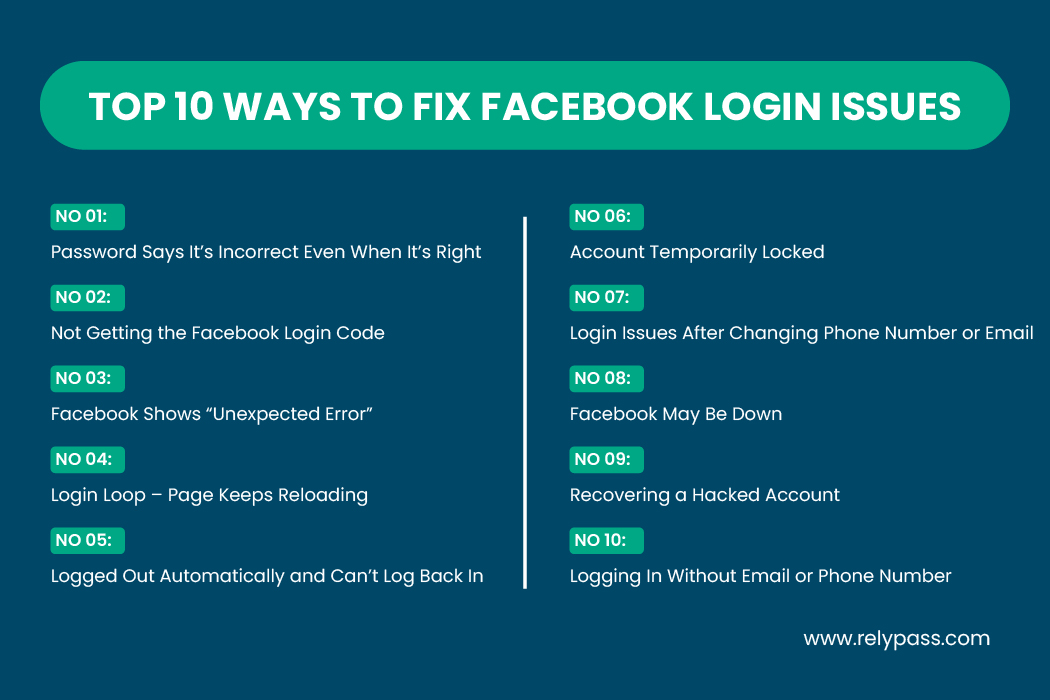
Fix 1: Password Says It’s Incorrect Even When It’s Right
Many Facebook login issues start with password confusion. Here’s what to do:
- Make sure the caps lock is off.
- Turn off auto fill and type the password manually.
- Try logging in with your phone number or username.
- Reset your password using a different device.
- Clear your browser cache and cookies.
- Check your password manager for outdated entries.
Fix 2: Not Getting the Facebook Login Code
If you aren’t receiving the verification code, try these steps:
- Check spam and junk folders.
- Turn off VPNs if you’re using one.
- Restart your phone.
- Choose to send the code via email instead of SMS.
- Make sure your phone number includes the correct country code.
- Use the “try another way” option if it appears.
- Wait a few hours if you’ve requested codes multiple times.
- Contact your mobile provider to make sure messages aren’t being blocked.
Related content: Password Reset Email Not Arriving
Fix 3: Facebook Shows “Unexpected Error”
If an unexpected error blocks your login:
- Switch from Wi-Fi to mobile data or vice versa.
- Update the Facebook app.
- Clear the app cache.
- Try Facebook Lite.
- Log in through a mobile browser.
- Use private or incognito mode.
- Log out from other devices if possible.
Fix 4: Login Loop – Page Keeps Reloading
A login loop happens when the login page keeps refreshing. Try:
- Clearing cookies from your browser.
- Removing old or corrupted login sessions.
- Temporarily disabling password auto fill.
- Updating the app.
- Logging in from another device.
- Logging in on the desktop first, then your phone.
Related Content: Constant Password Reset Loop: What It Means & The Fix
Fix 5: Logged Out Automatically and Can’t Log Back In
Sometimes Facebook logs you out for security reasons:
- This happens if there’s suspicious activity.
- Someone may have tried logging in to your account.
- You may need to confirm your identity.
- Follow Facebook’s “secure your account” steps.
- Upload ID if requested to regain access.
Fix 6: Account Temporarily Locked
Facebook may lock your account if it detects unusual activity:
- Wait for the lock period shown on screen.
- Log in and follow the instructions to unlock.
- Submit an appeal if the option appears.
- Provide ID if Facebook requests it.
- Avoid trying repeatedly during the lock period.
Fix 7: Login Issues After Changing Phone Number or Email
If your old contact info no longer works:
- Try account recovery using any old emails.
- Check backup emails added earlier.
- Ask a friend to find your username from your profile.
- Follow the recovery instructions carefully.
Fix 8: Facebook May Be Down
Sometimes Facebook login issues aren’t on your end:
- Check if others are having the same problem.
- Feeds, messages, or login may not load.
- Wait a little while and try again later.
Fix 9: Recovering a Hacked Account
If your account was hacked, you may notice:
- Profile details changing without your action.
- Passwords no longer working.
- Two-step verification being removed.
Use the hacked account recovery page, review recent activity, and secure your account immediately.
Related content: How to Protect Yourself on Social Media: A Guide
Fix 10: Logging In Without Email or Phone Number
You can still get in even if you lost access to your email or phone:
- Use your Facebook username.
- Use trusted contacts if you set them up.
- Log in from an Android device previously linked to your account.
- Complete identity verification steps.
- Submit recovery forms if prompted.
Advanced Recovery Methods
Some situations need deeper steps that most guides skip. These methods help when standard fixes don’t work.
Use Your Browser History
If you forgot which email you used, search your browsing history for the login page. It often shows the account you used before.
Use Saved Data on One Device
Sometimes your phone still has a saved login token even if the password is changed. Open the app on that device and update your details.
Try “Identify Your Account”
This tool finds your account using:
- Phone number
- Username
- Your name
Upload a Clear Photo of Your ID
If your account was locked because of suspicious activity, uploading your ID helps restore access.
Try an Earlier Recovery Link
Some users receive older recovery links in their inbox. These can still work if the system hasn’t expired them yet.
How to Report Facebook Login Issues
If nothing else works, reporting the problem is your next step:
- Search for “report Facebook login issue.”
- Use the official recovery forms on Facebook.
- Provide correct details and screenshots if needed.
- Check your email for responses from Facebook support.
How to Stop Facebook Login Issues for Good
Most problems can be avoided with simple habits. Here are the best ways to prevent Facebook login issues long term.
Use a Password Manager
This keeps your login details consistent on all devices. It also stops you from reusing weak passwords.
Update Your App
Old app versions trigger a lot of Facebook login issues because they cannot work well with current systems.
Avoid Public WiFi
Public WiFi creates unsafe login conditions. The system may block attempts from these networks.
Keep Backup Codes Saved
These codes help you log in even when you cannot access your phone.
Remove Old Devices
Go to your security settings and remove devices you no longer use.
Review Your Security Settings Regularly
Make sure your phone number and email are updated. This prevents confusion during recovery.
How Facebook Detects Unusual Login Activity
This new section will help readers understand Facebook’s security behaviour and why it sometimes blocks accounts even when nothing is wrong.
How Facebook Tracks Login Patterns
Facebook studies your regular login habits. It looks at your location, device type, browser settings, and activity style. When something suddenly changes, the system may think the activity is suspicious. That is why travelling to a new region can trigger Facebook login issues.
What Happens When Activity Looks Suspicious
When Facebook detects a sudden shift, it may temporarily block your login and ask for identity checks. This is meant to protect your account, not inconvenience you. It is normal and usually easy to fix once you confirm your identity.
Mistakes People Make That Cause Facebook Login Issues
Many people unknowingly create situations that lead to login failures. Small mistakes can turn into bigger problems.
Using Public WiFi for Login
Public WiFi often interferes with secure connections. Logging in from these networks can cause Facebook to block the attempt for safety reasons.
Ignoring App Updates
Old app versions cannot connect smoothly to newer Facebook systems. This is one of the most common but overlooked reasons behind Facebook login issues.
Storing Passwords on Multiple Apps
Sometimes people save passwords on their browser, phone, laptop, and multiple password tools. When these passwords become mismatched, login errors occur.
Logging in on Shared Devices
If you log into Facebook on shared computers and forget to log out, the system may later identify the activity as unsafe and block your login on another device.
Tips to Avoid Facebook Login Issues
You can reduce login problems by following a few habits:
- Store login details safely.
- Keep backup codes in a safe place.
- Update apps regularly.
- Avoid repeated failed login attempts.
- Use a secure password manager like RelyPass to save credentials across devices.
Related Content: What Would a Password Manager Allow You to Do?
End Note
In the end, Facebook login issues are common, and most of them are easy to fix once you know the reason behind them. It could be a password mix up, a security check, or a temporary system problem.
By following the steps in this guide and keeping your account details updated, you can get back into your account faster and avoid the same issues later on.
Frequently Asked Questions
Why can’t I log in to Facebook?
Check your password, device, or app version. Sometimes Facebook may block login for security reasons.
Is Facebook having login problems today?
Occasionally, the service itself may be down.
Why is Facebook blocking my login?
Unusual activity or multiple failed attempts can trigger a temporary block.
How can I tell if my account was hacked?
Look for changes in your profile, password, or messages you didn’t send.
Why won’t Facebook accept my correct password?
Saved passwords may be outdated, or Facebook may have reset it for security reasons.
Why is Facebook suddenly not working?
App errors, cache problems, or service interruptions can cause login problems.
Does Facebook notify users if an account is hacked?
Yes. Facebook usually sends an alert through email or notification.

Apps Logging Out: Why It Happens and How to Fix It - RelyPass
January 17, 2026[…] Social media apps like Facebook are especially prone to login bugs. If you’re specifically having trouble staying signed into Facebook, the issue might be related to Facebook’s own login system rather than your device. Learn more about common Facebook login problems and how to fix them. […]
Constant Password Reset Loop: What It Means & The Fix - RelyPass
January 17, 2026[…] Facebook has known login problems that require different troubleshooting steps. See our guide on fixing Facebook login issues for targeted […]
Locked out of Instagram: Ways to Recover - RelyPass
January 17, 2026[…] security systems. If you’re also struggling with Facebook login, check our detailed guide on how to fix Facebook login issues for step-by-step […]
Autofill Not Working: Best Solutions to Solve This Issue - RelyPass
January 17, 2026[…] everywhere else. If Facebook is the only site where autofill fails, check our detailed guide on common Facebook login problems and fixes for targeted […]