


7 QR Code Scams iPhone Users Fall For (And How to Stay Safe)
TLDR A QR code scam happens when someone creates a fake code that sends you to a bad website. The site may steal your passwords, payment details or personal information. It can happen at a parking meter, a cafe table, or an email that tells you there is a package waiting. The safest way to protect yourself is to always preview the link before you open it and avoid codes from people or places you do not trust. If anything feels off, stop right away.
That QR code at the parking meter might not be real
You scan QR codes at parking meters, cafés, delivery slips, and more without thinking. That’s exactly how a QR code scam slips in. Scammers place fake codes that look completely real, and one quick scan can lead to a strange page asking for login details or payment.
Many people only realize something is wrong after they tap and start worrying about what information they shared.
In this blog, I will show where QR code scams commonly appear and the simple step that keeps you safe: always preview the link before opening it. One quick check protects your iPhone and your information.
So, let’s begin the discussion.
Why QR Code Scams Are Harder to Spot Than Email Phishing
Email scams usually give you hints. You can see who sent the message, notice odd spelling, or spot a link that looks strange. Your mind gets a moment to slow down and think before you click.
A QR code feels different. It hides everything inside a pattern of black and white squares. You cannot see the link, the sender, or the source. You just see a sticker on a door, a card on a table, or a sign near you. It blends into the space around you, so it feels harmless.
Scammers understand this very well. They cover real codes with fake ones. They print stickers that fit into the design of official signs. They place them in crowded spots where people hurry and do not pay attention.
The moment you scan a code like that, you end up on a page they control. It happens fast and without any hint of danger. This trick, often called quishing, pulls you into a fake site without needing a message or email. It is one of the reasons a QR code scam can fool people so easily.
Related Blog: What Is a Common Indicator of a Phishing Attempt? Top Red Flags to Know
7 QR Code Scams You Are Likely to Fall For
These are the most common situations where an iPhone user ends up clicking something that was never safe. Each one is short, simple, and based on real behavior, not theory.
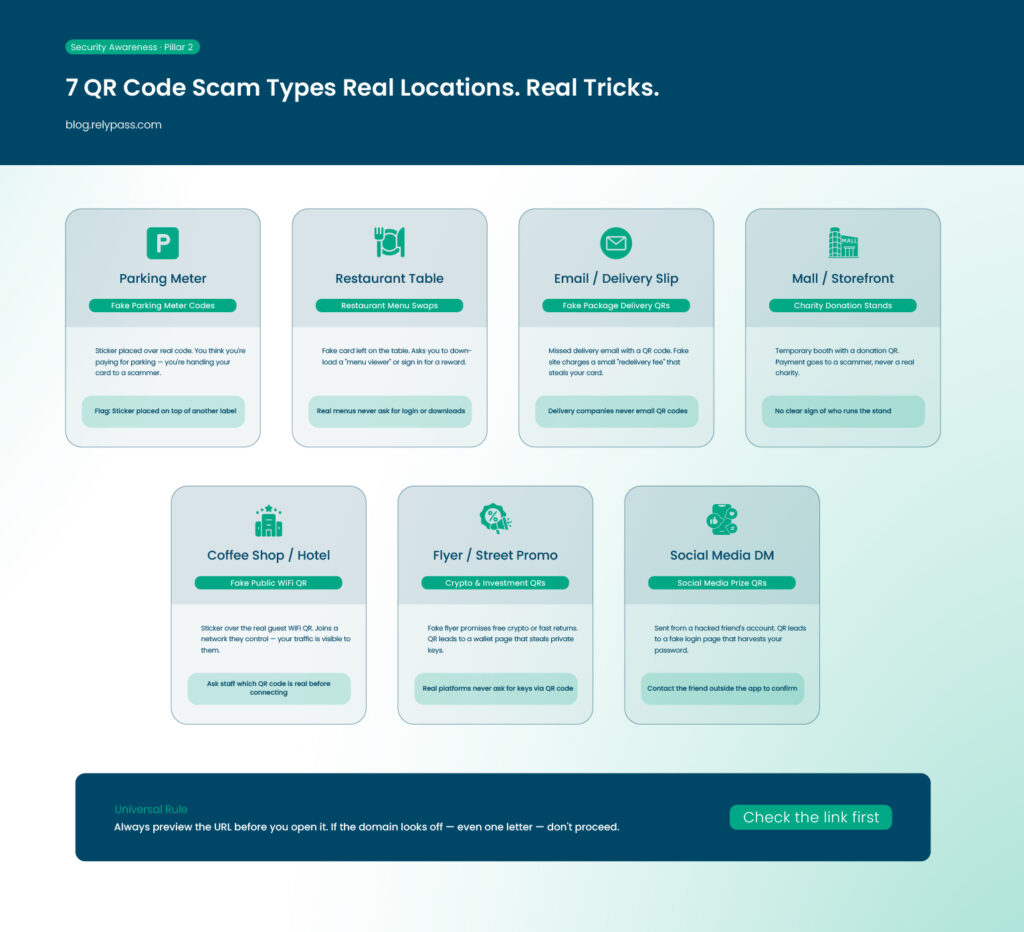
So, the top 7 QR code scams are:
1. Fake parking meter codes
You walk up to a meter and see the QR code for payment. It looks official because it sits exactly where the real code should be. Scammers peel off the original code and place their own sticker. When you scan it, the site asks for your card details.
You enter them because you believe you are paying for parking. The red flag is a page that looks slightly different from what you remember or loads with odd spacing. The safe step is to check if the sticker looks new or if it is placed on top of another label.
2. Restaurant menu swaps
Some restaurants use QR codes for menus. This creates the perfect moment for a QR code scam. A scammer leaves a small card with a fake code on a table or places a sticker on a stand. When you scan it, you may see a page that tells you to download a “menu viewer” or sign in for a reward. A real restaurant menu never demands a download or login. If anything pops up asking for your details, stop.
3. Package delivery QR codes in emails
A missed delivery message can trigger stress. You get an email that says your package could not be delivered, and you must scan the QR code to reschedule. This leads to a fake site with a small “fee” that steals your card details.
Delivery companies never ask you to scan a code from an email. That is the red flag. Delete the message or check your actual delivery app instead.
4. Charity donation stands
You may see a booth at a mall or outside a store with a donation board and a simple QR code. Many people give because the setup looks friendly and the cause sounds real. A QR code scam in this scene sends you to a page that takes your payment but never goes to a charity.
The red flag is a stand that looks temporary or has no clear sign of who is running it. Only scan codes from verified charity groups.
5. Fake public WiFi QR codes
Coffee shops often let guests join WiFi by scanning a QR code. Scammers know this is common. They place a sticker on top of the real one. When you scan it, your phone joins a network controlled by them. This lets them watch your traffic or redirect you to fake login pages. The warning sign is a code on a loose paper or a sticker that looks too fresh. Ask staff which QR code is real before you connect.
6. Crypto and investment QR codes
Many fake investment flyers promise quick gains. Some offer free crypto if you scan the code. Others send you to a wallet page that tries to grab your private keys. This qr code scam works because it feels like a fun promotion. The red flag is any offer that pushes you to act fast or hand over your wallet details. Real crypto platforms never ask for keys through QR codes.
7. Social media prize QRs
Scammers break into accounts and send QR codes through messages. You may see a note from a friend saying you can win a prize, take a survey, or confirm your identity. The moment you scan it, you land on a login page that steals your password. If a friend sends a QR code without context, pause. Contact them outside the app to confirm.
Already Scanned a Suspicious QR Code? Do This Now
A scam can happen fast. What matters most is what you do in the next few minutes. These steps help limit the damage.
- Close the page right away. Do not tap anything on the site.
- Do not enter passwords or card details after scanning a code that feels wrong.
- If you entered any login information, change that password as soon as possible.
- Check your email for security alerts about new logins.
- Look at your bank transactions for charges you do not recognise.
- Run a malware scan if you downloaded any file from the page.
If you use a password manager that stores everything offline, such as RelyPass, the rest of your accounts remain safe. A QR code scam usually targets one login page.
If only one password were exposed, your other accounts would stay protected. Offline storage means nothing is sent to a cloud where an attacker can grab it.
End Note
In the end, QR code scams are showing up more often in places we use every day, like cafés, parking meters, and delivery slips. The real danger usually starts after you scan, when a fake site tries to trick you into sharing personal or payment details.
Staying safe is simple if you slow down for a second and check the link before opening it. And if you use a secure password manager like RelyPass, your accounts stay better protected even if something goes wrong. A small habit like this can save you from big trouble.
Frequently Asked Questions
Q: How do I know if a QR code is a scam?
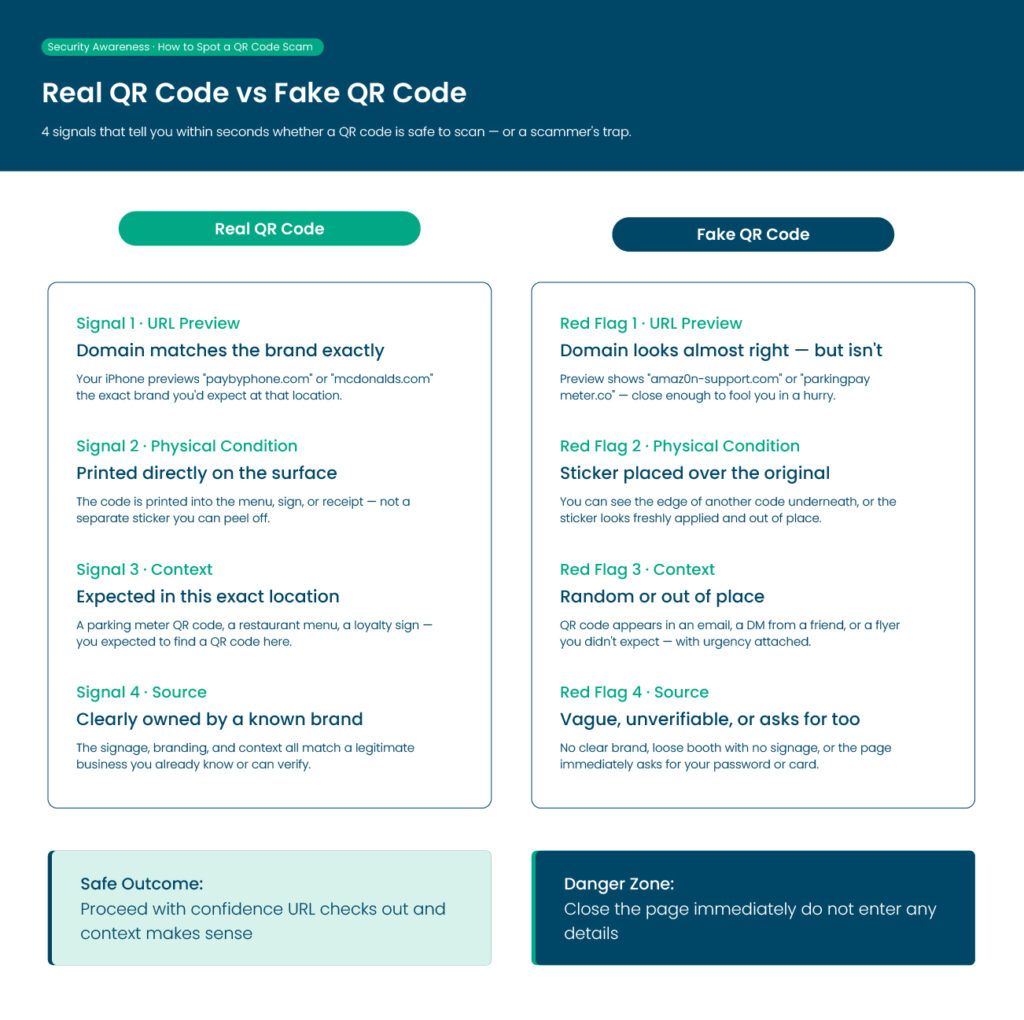
A: The most reliable sign is the URL it sends you to. After scanning, your iPhone previews the link before you open it — check if the domain matches the place or brand you’re expecting. Scammers use URLs that look close but not quite right, like “amaz0n-support.com” instead of “amazon.com.” If the QR code is a physical sticker placed on top of an existing one, that’s a major red flag. Legitimate QR codes at restaurants and parking meters are usually printed directly, not stuck over something else.
Q: Can scanning a QR code hack your iPhone?
A: Scanning a QR code itself doesn’t hack your iPhone — the danger is where it takes you. If the QR code leads to a fake website that looks real, and you enter your username, password, or payment details there, that information goes straight to the scammer. Some advanced attacks can also try to install a malicious profile on your device if you approve prompts on the fake site. The rule is simple: never enter login details or approve anything on a page you reached by scanning a random QR code in public.
Q: How do I avoid QR code scams on iPhone?
A: Before opening any QR code link, check the URL preview that appears on your iPhone screen. Don’t proceed if the domain looks unfamiliar or slightly misspelled. Avoid scanning QR codes from emails, texts, or social media posts unless you were expecting them from a known source. In public, look for signs the QR code sticker has been placed over the original. If you do need to scan and enter details, use a password manager so your credentials are stored securely offline and not shared across accounts — that way, even if one site gets compromised, the rest stay protected.
Q: What should I do if I have already scanned a suspicious QR code?
A: Close the page right away and do not enter any details. If you typed in a password, change it as soon as possible. Check your bank and email accounts for any strange activity. If you downloaded anything after scanning, remove it and run a security check on your phone. Acting fast helps limit damage from a QR code scam.
Q: Are QR codes in restaurants and shops safe to use?
A: Many are safe, but you still need to stay careful. Some scammers place fake stickers over real QR codes on tables or counters. Before scanning, check if the code looks printed or if it looks like a sticker placed on top. If anything looks off, ask staff for confirmation or use the official app or menu instead.
Q: Can a QR code steal my personal data without me typing anything?
A: A QR code itself cannot take your data. The risk starts after you scan it. If it sends you to a fake website, that site may try to trick you into entering details like passwords, card numbers, or phone numbers. Some pages may also try to get you to allow permissions or downloads. The danger comes from what you interact with after scanning, not the scan itself.